Android document hub: Orbit PDF Document Reader for mobile workflows
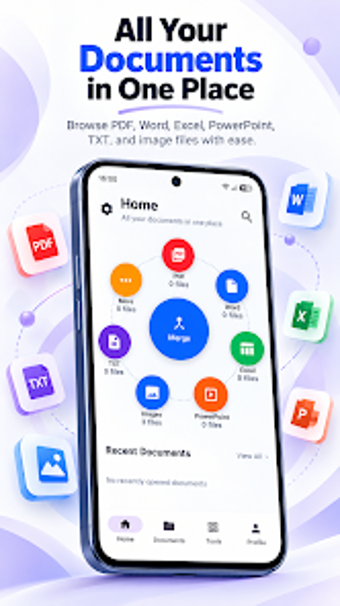
Combines a document viewer, PDF editor, and mobile scanner into a single workflow: view PDFs, Office files, and scanned pages in one place. TopRate Studio supplies an Android productivity tool with offline access and multitool capabilities. Key functions include annotation, page manipulation, conversion between images and PDFs, and password protection. Designed for students, business professionals, and remote workers who need to handle, edit, and share documents on a phone or tablet.
What is Orbit used for in daily document work?
Orbit targets mobile document management by letting users open PDF, Word, Excel, PowerPoint, and plain text files and keep them in one hub. File viewing covers standard office formats without conversion loss, and the scanner captures paper into PDF. This positions Orbit as a single-entry point for reading, editing annotations, and turning physical paperwork into digital deliverables on Android devices.
How does Orbit structure the core workflow and output?
The workflow moves from capture to edit to export: use the built-in scanner to create PDFs, apply annotations or freehand drawing, then merge or split pages and export results. Conversion tools convert Office documents and images into PDF, while merge/split reorders document pages. Lists of actions appear in-app for file management, so you can produce a final PDF without switching applications.
Is the interface and onboarding suitable for mobile professionals?
The interface emphasizes accessible controls and dark mode, with search for text inside documents and visible annotation tools. The app is lightweight and runs offline, reducing dependency on connectivity during field work. Prior experience with PDF editing helps with advanced actions like reordering pages, but basic tasks such as highlighting and scanning are available immediately from the main view.
How does Orbit handle compatibility, sharing, and security?
Orbit supports a broad set of formats including DOC, DOCX, XLS, XLSX, CSV, PPT, PPTX, and TXT, and offers direct printing and sharing for all supported types. Security features include password protection and digital signatures for PDFs, enabling document control before distribution. These elements suit collaborative or client-facing workflows that require format fidelity and protected exports.
Who should use Orbit and where it fits in a mobile workflow
Orbit suits mobile professionals and students who need a consolidated Android tool for capturing, editing, and exporting documents without switching apps. The requirement for a modern Android release is the main trade-off, since optimal performance depends on up-to-date system software. For anyone prioritizing on-device document handling and format compatibility, Orbit offers a focused option that reduces the number of separate utilities needed.